
Found for you. Trashed only when you say so.
Caches, build output, dependency trees, simulators, disk images and old downloads are grouped and totalled. Tick what to clear, open a group to see every file in it, and press Clean. Everything goes to the Trash, never to oblivion.
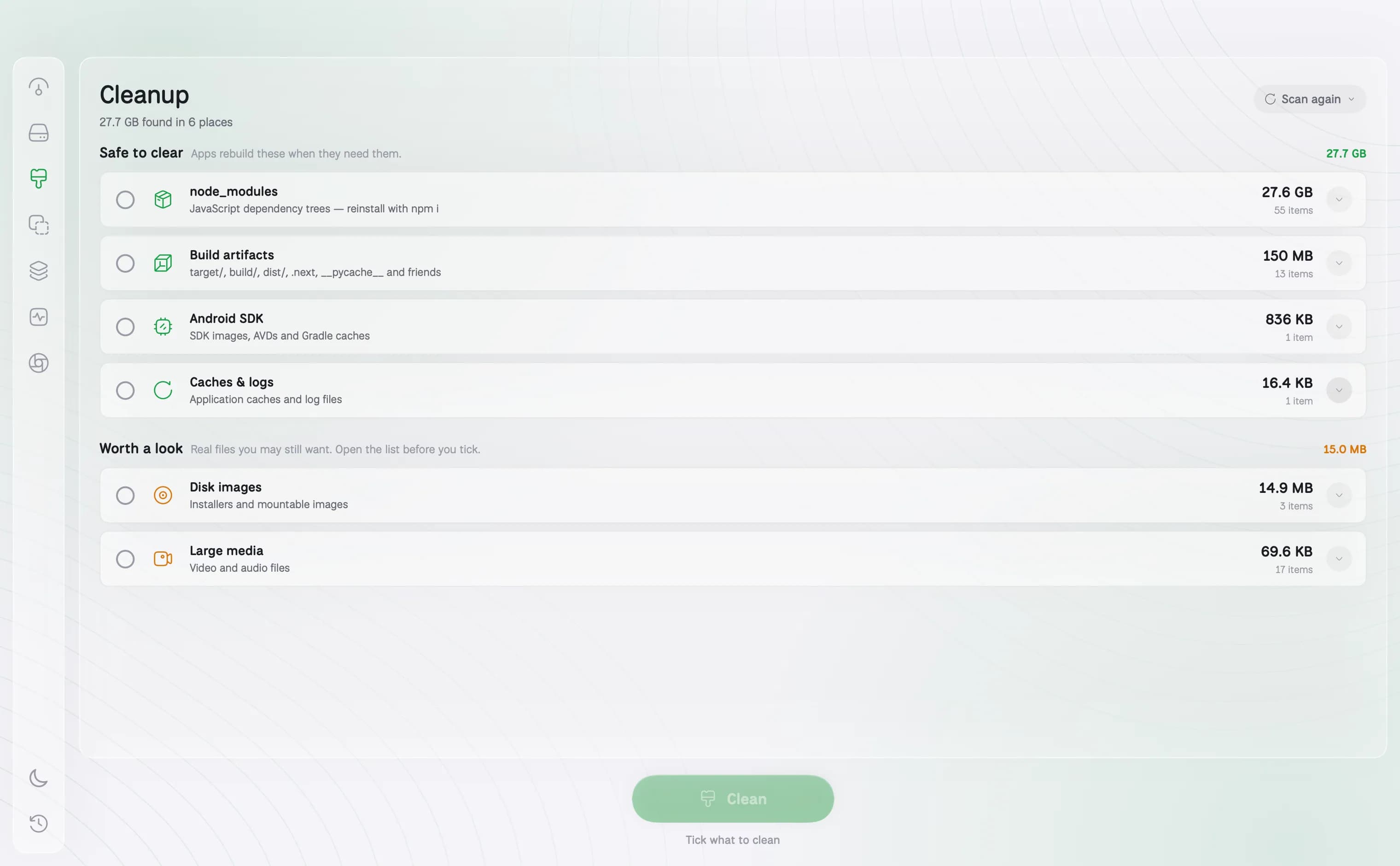
- Safe to clear: things apps rebuild on their own
- Worth a look: real files you may still want, listed before you tick
- Moves to the Trash, so any mistake is a drag away from undone
How it works
01
Safe to clear
Caches, logs, node_modules, build folders, package caches and simulator data: things your apps and tools rebuild on their own when they need them.
02
Worth a look
Downloads, disk images and large media: real files you may still want. They are listed item by item so you decide on each one before ticking it.
03
Nothing goes behind your back
Tick what to clear, open any group to see every file in it, and press Clean. Items go to the Trash, so a mistake is a drag away from undone. Permanent deletion is a separate choice with its own confirmation.
04
Only what can actually go
Folders macOS keeps for itself, and items you do not have permission to move, are left out of the list instead of failing at the end.
Questions about Cleanup
Is it safe to delete caches on a Mac?+
Yes, in general. Caches are rebuilt by the apps that made them. An app may be a little slower the first time it runs afterwards while it rebuilds them.
Does DiskBuddy delete files permanently?+
Not unless you choose to. By default everything goes to the Trash. You can pick permanent deletion when you want the space back at once, and it asks you to confirm first.
Will it clean my Downloads folder?+
It lists what is in Downloads under Worth a look, one item at a time. Nothing there is ticked for you.
The other rooms
Next: Duplicates →- OverviewOne scan, and the whole drive on one screen.See Overview →
- FindAny file on your Mac, found as you type.See Find →
- SpaceThe heavy things come to the top.See Space →
- DuplicatesFiles that exist twice, confirmed byte for byte.See Duplicates →
- ApplicationsEvery app, with its real footprint and its real habits.See Applications →
- MonitorWhat the Mac is doing, right now.See Monitor →
- CompressShrink it instead of deleting it.See Compress →
- ActivityWhat it has done for you, week by week.See Activity →
One app for the whole disk
Every room in one download. Pay once, keep it, and every update is included.
One payment, no subscription. Your key and the download arrive the moment the payment clears.